Turn Off WhatsApp Media Auto-Download and End Data Spillage on Your Device
Stop Wasting Data on Files You Never Asked For
Data has become one of the most valuable digital resources. Whether you use mobile data for work, business, communication, or entertainment, every megabyte counts. Yet many people unknowingly allow their devices to consume large amounts of data downloading photos, videos, voice notes, and documents they may never open.
One of the biggest contributors to this hidden data consumption is WhatsApp’s media auto-download feature.
If your phone automatically downloads every image, video, GIF, and document sent to your chats, you could be spending money on content you neither requested nor need. Turning off this feature is one of the easiest ways to reduce unnecessary data usage and keep your device running more efficiently.
What Is WhatsApp Media Auto-Download?
Media auto-download is a setting that allows WhatsApp to automatically save incoming media to your phone whenever new messages arrive.
Depending on your settings, WhatsApp may download media while using mobile data, Wi-Fi, or even during roaming. This means your phone begins consuming data immediately without waiting for you to decide whether you actually want to view or save the file.
While the feature is convenient for some users, it can become a major source of unnecessary data consumption.
Data Spillage Happens More Often Than You Think
Imagine belonging to several family groups, workplace groups, school groups, church groups, or community forums.
Throughout the day, hundreds of photos, forwarded videos, memes, promotional flyers, and voice notes are shared. Even if you never open them, many of those files have already been downloaded to your phone.
That is data you paid for.
It is also storage space occupied by files you may never use.
Over time, these automatic downloads can consume gigabytes of storage, slow down your phone, increase backup sizes, and force you to purchase additional data sooner than necessary.
This is digital waste that can easily be prevented.
Productivity Means Using Less to Achieve More
True productivity is not simply about working harder. It is about using resources wisely.
The same principle applies to mobile data.
When you reduce unnecessary downloads, you reserve your data for activities that genuinely matter, such as:
Attending online meetings
Sending important business documents
Researching information
Managing your business online
Learning new skills
Communicating with clients and customers
Using less data for waste means having more data available for productive tasks.
Save More Money by Eliminating Waste
Increasing your financial capacity is not only about earning more money.
It also involves reducing unnecessary expenses.
Every unwanted video, duplicated image, or forwarded clip downloaded automatically represents data you paid for without receiving real value.
Small savings made every day accumulate over weeks and months.
By turning off automatic media downloads, you gain greater control over how your data is spent. Instead of constantly buying extra data bundles because of unnecessary downloads, you can stretch your existing data plan much further.
Your Phone Stays Cleaner Too
Disabling media auto-download offers benefits beyond saving data.
Your device will no longer become cluttered with thousands of unwanted files. This helps to:
Free up storage space
Improve phone performance
Reduce unnecessary backups
Make your photo gallery easier to organize
Extend the useful life of your device by reducing storage congestion
Instead of sorting through hundreds of random images later, only the files you intentionally download will occupy your storage.
How to Turn Off WhatsApp Media Auto-Download
Disabling the feature only takes a minute.
Open WhatsApp.
Tap the three-dot menu (Android) or go to Settings (iPhone).
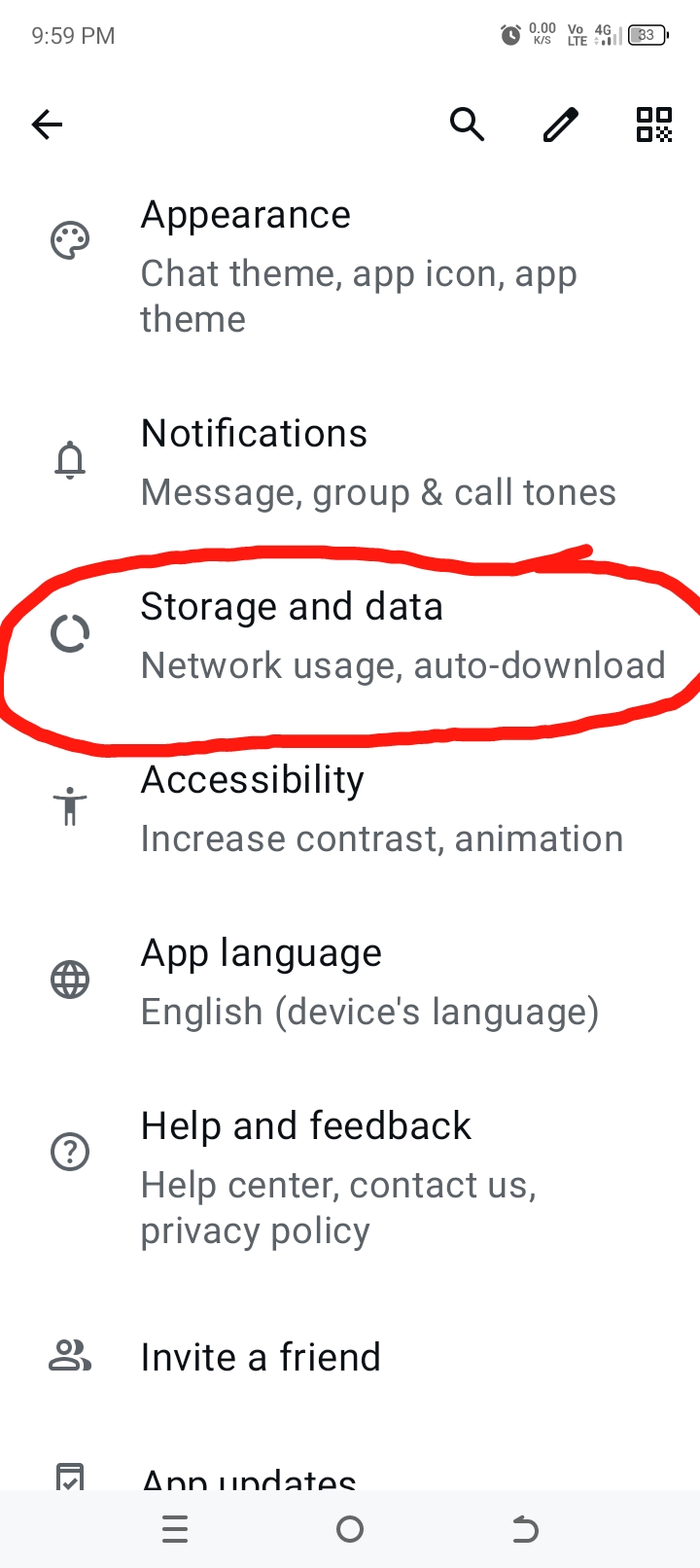
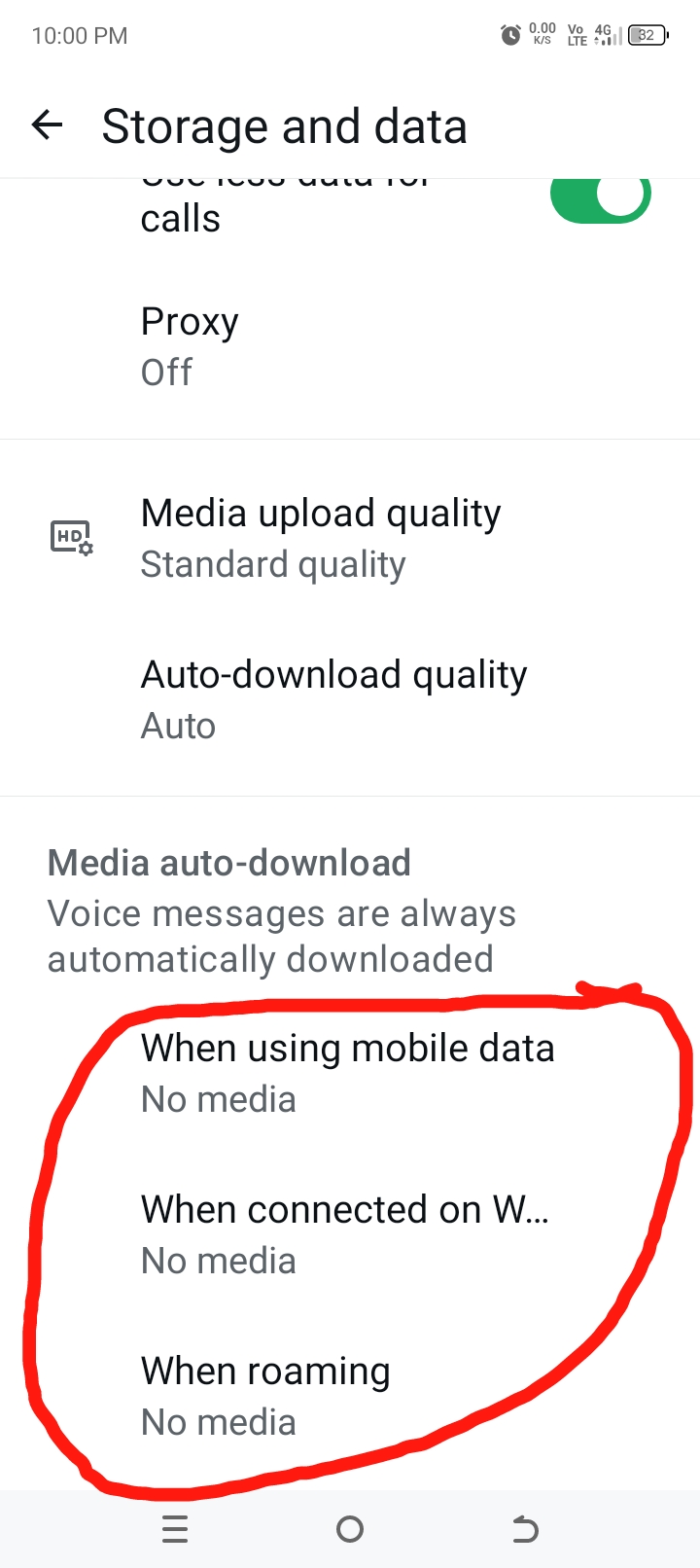
Select Storage and Data.
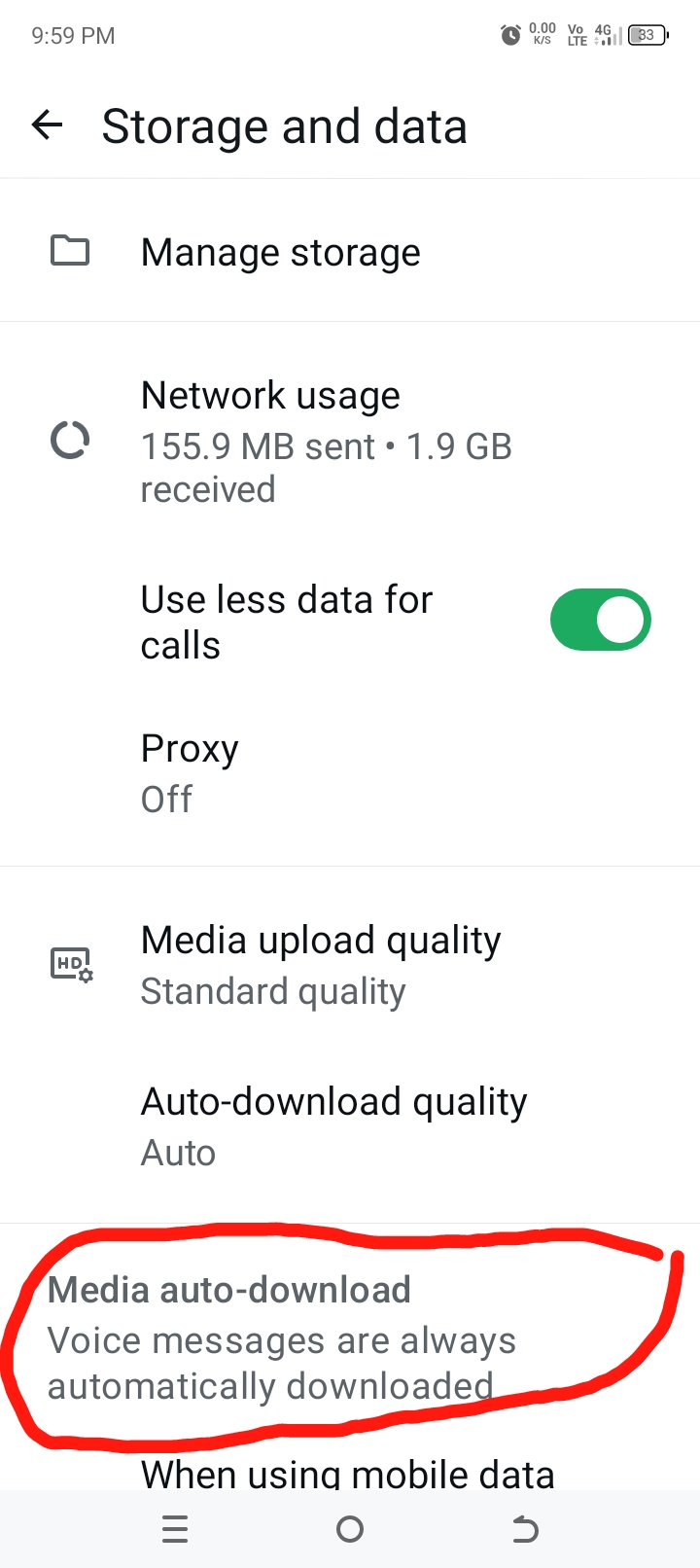
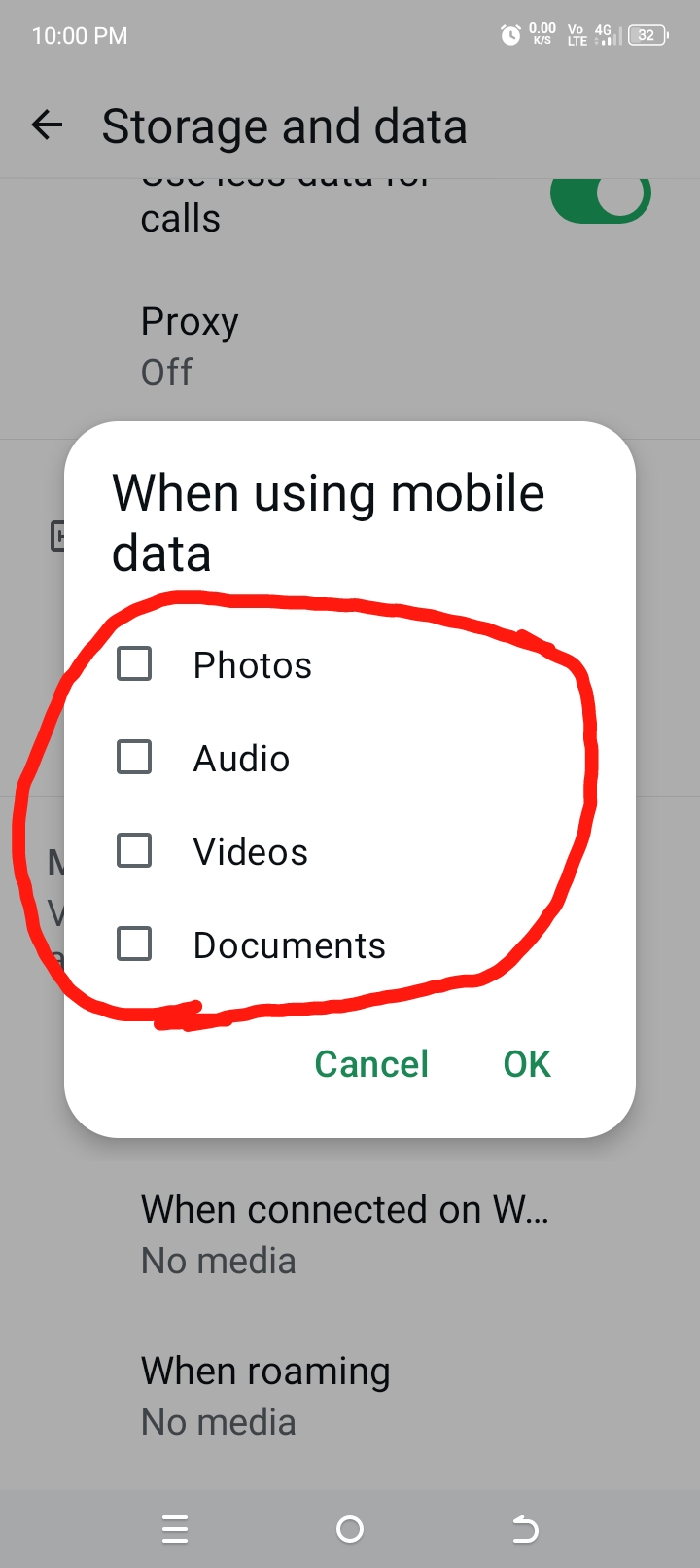
Under Media Auto-Download, open each option:
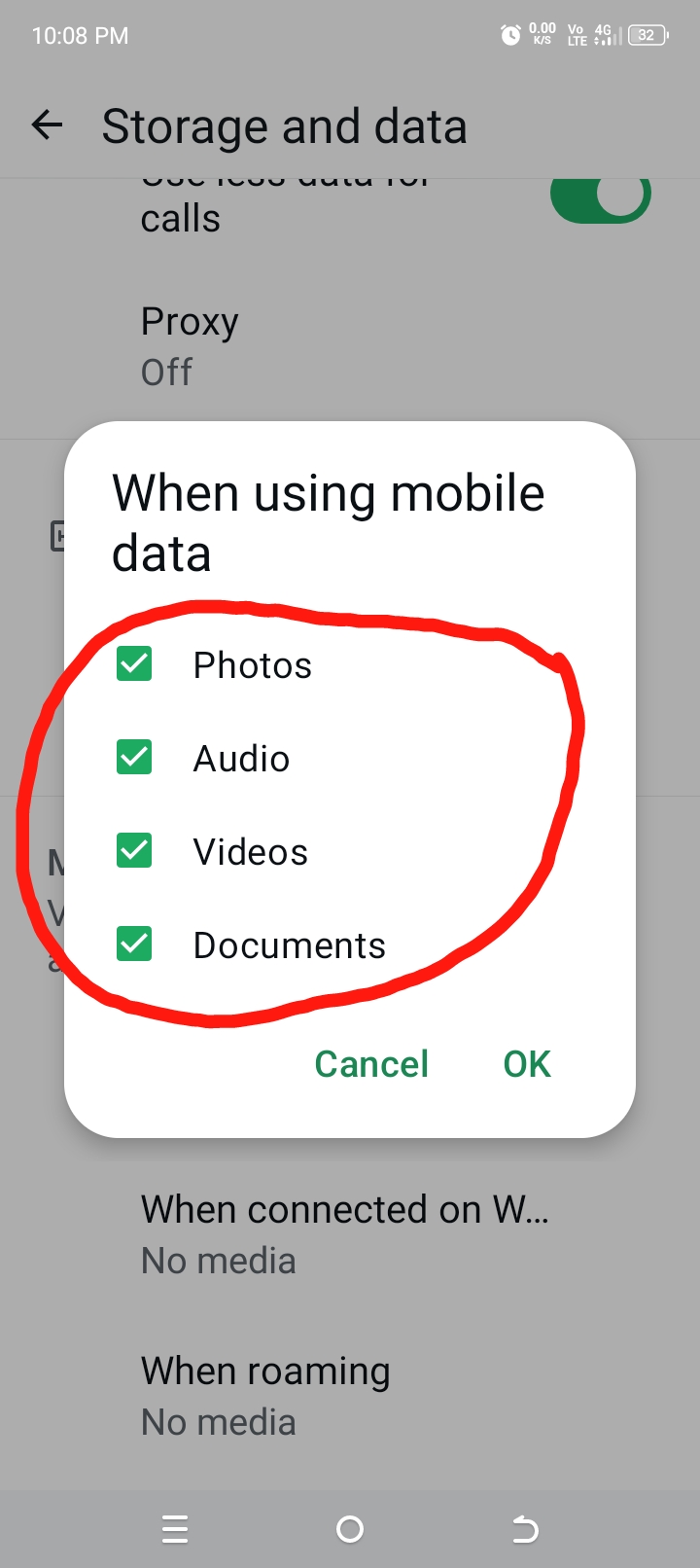
When using mobile data
When connected on Wi-Fi
When roaming
Uncheck all media types or choose only the ones you want downloaded automatically.
Save your changes.
After this, WhatsApp will only download media when you tap on a specific file. You remain in complete control of what uses your data and storage.
Small Change, Big Difference
Many people focus on finding larger data plans without realizing they can reduce consumption simply by changing a few settings.
Turning off WhatsApp media auto-download is a practical way to end unnecessary data spillage, reduce storage clutter, and make your data work for you instead of disappearing into files you never wanted.
Every megabyte saved is money preserved.
Every unnecessary download prevented is a step toward smarter digital habits.
Go to Settings
Then, Storage and data
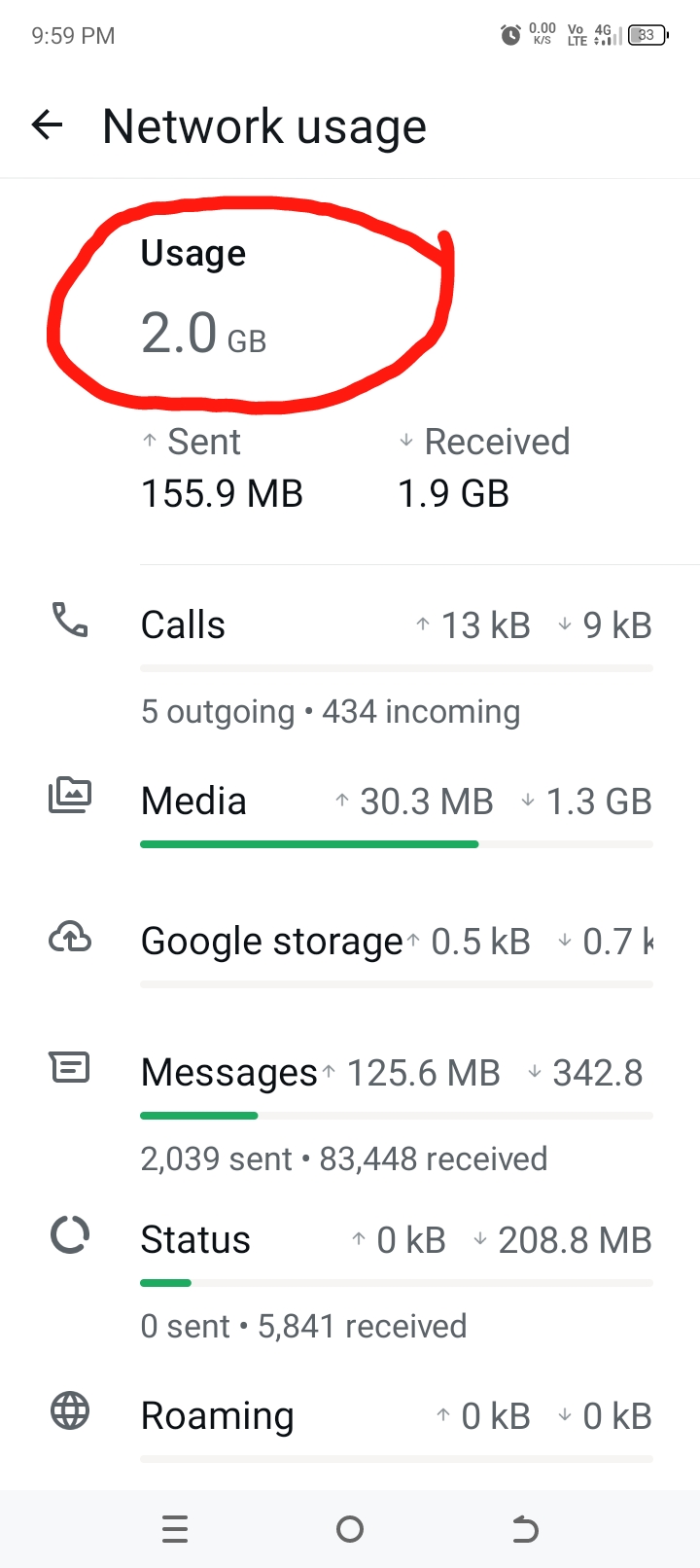
WhatsApp can take several gigabytes of your data if not properly checked. Money running into thousands.
Media Auto Download
By taking control of your WhatsApp settings today, you can use less data, reduce waste, improve your phone’s performance, and make every data purchase go further.
I WANTED INTIMACY BUT HE TURN ME DOWN It sounds like Tiwa Savage shared a candid moment from her personal life, shedding light on the vulnerability even public…
MEDIA HOUSES AND THEIR ADDRESSES IN ONDO STATE Ondo State Radiovision Corporation (OSRC)Orita Obele AkureOba-Ile, Akure Nigerian Television Authority (NTA)Oke-Isikan, Isikan Area, Akure, Akure News Agency of Nigeria…
JAMB cut off marks for Sule Lamido University Approved Cut-Off Marks of Undegraduate Programmes for the 2021/2022 Academic Session. Sule Lamido University The beginnings of Sule Lamido University…
Botswana Media The Daily News is the state-owned daily newspaper, published in Setswana and English and there are also independent newspapers published…