How to Use Mobile Data Effeciently, Make It Last Longer
Mobile data has become an essential part of everyday life. Whether you use it for work, communication, entertainment, or learning, running out of data before the end of your subscription period can be frustrating and expensive. Fortunately, a few simple adjustments can significantly reduce data consumption without affecting your overall smartphone experience.
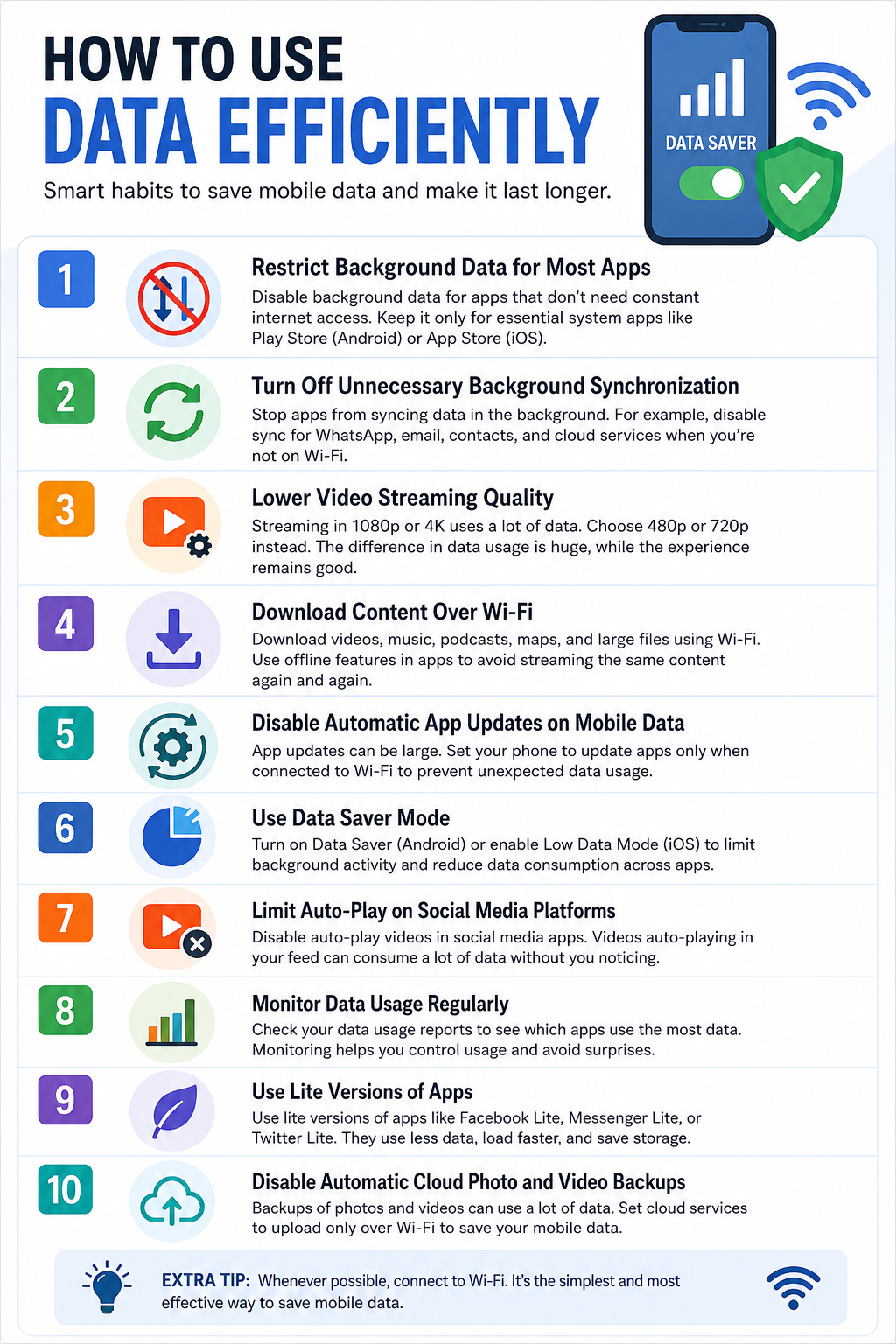
1. Restrict Background Data for Most Apps
Many apps continue using data even when you are not actively using them. Social media apps, shopping apps, games, and news apps frequently refresh content in the background, consuming valuable data without your knowledge.
Go through your phone settings and disable background data for apps that do not need constant internet access. Keep background data enabled only for essential system services and a few important applications. On Android, core services such as Play Store may occasionally require background access, while on iPhone, App Store updates may need limited background activity.
By preventing unnecessary background connections, you can save a significant amount of data every month.
2. Turn Off Unnecessary Background Synchronization
Many applications constantly synchronize data with their servers. This includes chats, cloud storage, emails, contacts, calendars, and social media accounts.
Review the synchronization settings on your device and disable automatic syncing for services that are not critical. For example, you may choose to sync WhatsApp backups only when connected to Wi-Fi instead of mobile data. The same applies to cloud photo backups and large file synchronization services.
Reducing unnecessary synchronization prevents hidden data usage that often goes unnoticed.
3. Lower Video Streaming Quality
Video streaming is one of the biggest consumers of mobile data. Watching videos in 1080p or 4K can use several times more data than viewing the same content in standard definition.
Most streaming platforms allow users to choose video quality manually. Selecting 480p or 720p often provides a good viewing experience while dramatically reducing data consumption.
This adjustment is especially useful for platforms such as video-sharing sites, social media feeds, and online learning services.
4. Download Content Over Wi-Fi
Whenever possible, download large files, videos, podcasts, music, maps, and software updates using a Wi-Fi connection.
Many apps offer offline viewing or listening features. By downloading content in advance, you avoid repeated streaming sessions that consume mobile data every time you access the content.
Planning downloads while connected to Wi-Fi can save gigabytes of data each month.
5. Disable Automatic App Updates on Mobile Data
App updates can be surprisingly large. Some updates exceed hundreds of megabytes, and multiple apps updating automatically can quickly exhaust your data allowance.
Configure your device so that app updates occur only when connected to Wi-Fi. Both Android and iOS provide settings that allow users to restrict automatic downloads and updates to Wi-Fi networks.
This simple setting prevents unexpected data drains.
6. Use Data Saver Mode
Modern smartphones include built-in data-saving features designed specifically to reduce mobile data usage.
Android offers Data Saver mode, while iOS provides settings that limit background activities and reduce unnecessary network usage. These features restrict apps from using excessive data when running in the background.
Activating data-saving mode is one of the easiest ways to reduce consumption without constantly monitoring individual apps.
7. Limit Auto-Play on Social Media Platforms
Social media apps often autoplay videos as you scroll through your feed. Even if you do not watch the videos, data may still be used to load and buffer them.
Most platforms allow users to disable autoplay or restrict it to Wi-Fi connections only. Turning off autoplay can dramatically reduce data usage, particularly for users who spend significant time on social networking apps.
The savings become noticeable over weeks and months of regular use.
8. Monitor Data Usage Regularly
You cannot manage what you do not measure. Most smartphones include built-in tools that show how much data each app consumes.
Check your usage statistics periodically to identify apps that use excessive amounts of data. Some apps may be consuming data in the background without providing much value.
Monitoring usage helps you make informed decisions and quickly identify unusual spikes in consumption.
9. Use Lite Versions of Apps
Many popular services offer lightweight versions of their applications that are specifically designed to consume less data and storage space.
These lite apps often load fewer graphics, use less background activity, and compress content more efficiently. They can provide most of the functionality of the full version while significantly reducing data usage.
For users on limited data plans, lite applications can be a practical alternative.
10. Disable Automatic Cloud Photo and Video Backups
Photos and videos are among the largest files stored on smartphones. Automatic cloud backup services can upload these files continuously, consuming large amounts of mobile data.
Configure cloud storage services to upload media only when connected to Wi-Fi. This ensures your files remain backed up without draining your mobile data allowance.
Users who frequently record videos can save enormous amounts of data by making this single change.
Efficient data usage is not about avoiding the internet; it is about eliminating unnecessary consumption. Restricting background activities, reducing video quality, disabling automatic updates, and taking advantage of Wi-Fi connections can greatly extend the life of your data plan. When combined, these strategies help you stay connected longer, reduce costs, and gain better control over how your mobile data is used.
More
World’s first mobile phone call On April 3, 1973, a historic moment in telecommunications took place in New York City. Martin Cooper, an engineer at…
First mass produced mobile phone Nokia 1011 is the world’s first mass produced mobile phone. Nokia 1011 Nokia 1011 MADE: 1992-1994 in Germany MAKER: Nokia…
HOW TO MAKE KUNU AYA (TIGER NUT DRINK) Kunu aya is a popular, nutrition-filled drink made usually of tiger nuts. When properly done it’s refreshing to consume. Kunu…
How to make fried rice Fried Rice is a colorful, flavorful dish that holds a cherished place in Nigerian cuisine, often served at parties, celebrations,…
John textor to make… Everton badge, John TextorJohn Textor is keen on buying Everton from Farhad Moshiri.HOMENEWSJohn Textor makes contact with bank in new…
How to make Edikang Ikong soup How to make Edikang Ikong Soup Edikang Ikong (Edikaikong) soup is a meal of the Ibibios or Efiks people found…
HOW TO MAKE SOYA BEAN MILK INGREDIENTS Soyabeans Sugar/honey/ dates syrup Milk flavor/ milk PROCEDURE 1. Soak your soybeans overnight 2. Next morning wash off the…
HOW TO MAKE PEANUT BURGER INGREDIENTS Groundnuts- 3cups Eggs- 3 Flour- 6cups Milk falvour- 1 satchet Baking powder- 2 tablespoons Sugar— 1/4 cup Salt—- 1/3…
HOW TO MAKE CHIN-CHIN INGREDIENTS 6 cups all purpose flour 1½ cup sugar 125g butter/margarine 4 teaspoonful nutmeg (You will love the flavor) 2…
HOW TO MAKE OKPA Okpa INGREDIENTS Okpa flour– 4 cups Palm oil–11/2 cups Fresh pepper (habanero) Salt Uziza seed ( optional) — about 10 seeds Okpa has a…